The WhatsApp Status & Health Check section inside DMLY helps you monitor the condition of your connected WhatsApp Business account in real time. This ensures your messaging remains active, compliant, and operating without interruptions.
You can find this under:
Integrations → WhatsApp → Configuration
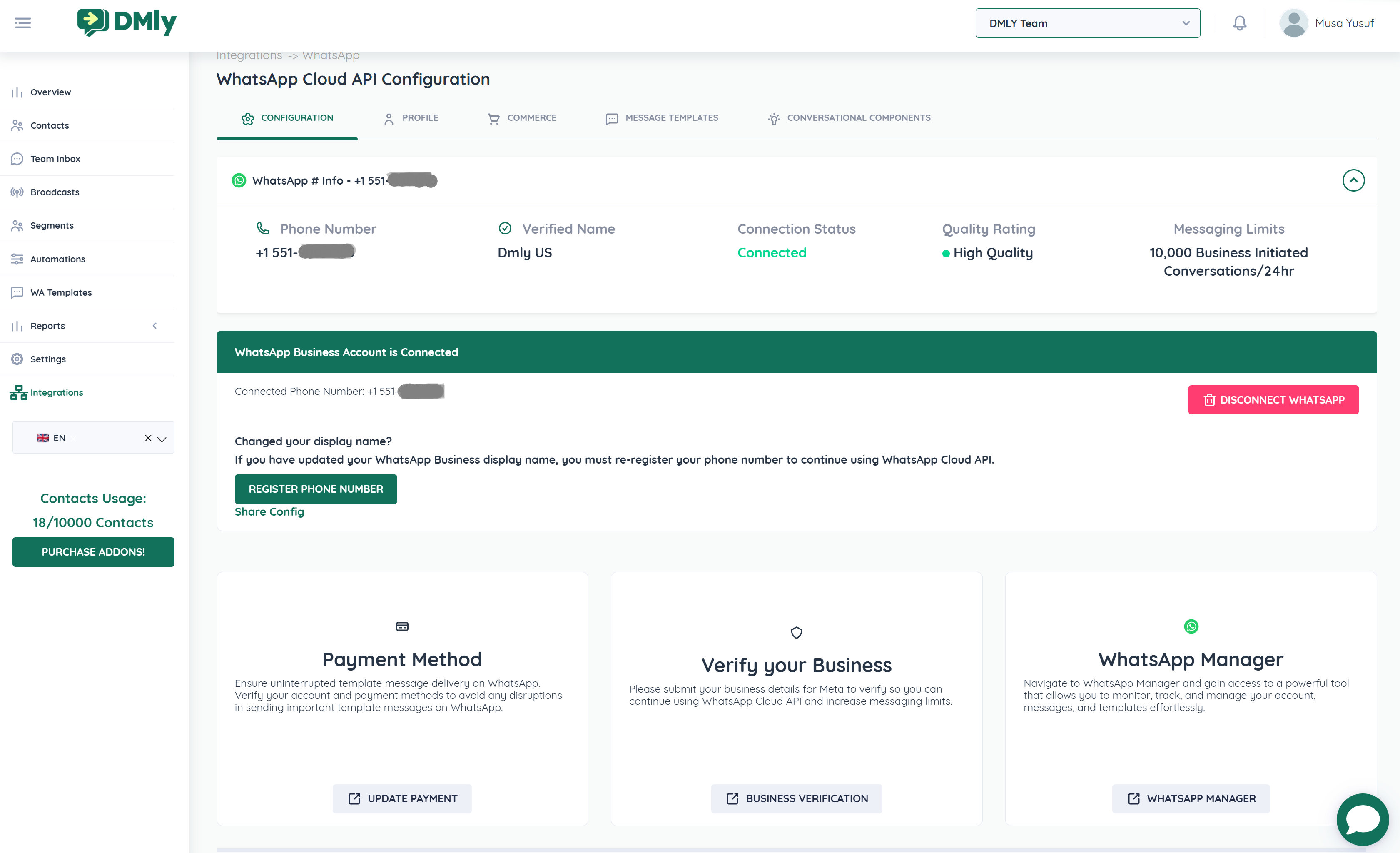
Once connected, DMLY displays key health indicators:
Shows the connected WhatsApp Business number.
Confirms which number is active
Helps verify the correct line is being used
Displays your approved WhatsApp Business display name.
If you recently changed your display name inside Meta:
You must click Register Phone Number
This re-registers the number to continue using the Cloud API
Failure to re-register may cause message delivery issues.
Indicates whether your WhatsApp is actively connected.
🟢 Connected – Everything is working properly
🔴 Disconnected – Messages will not send or receive
If disconnected:
Click Disconnect WhatsApp
Reconnect using the embedded signup process
Meta assigns a quality rating based on customer engagement.
🟢 High Quality
🟡 Medium Quality
🔴 Low Quality
Low ratings may reduce messaging limits or trigger restrictions.
Responding quickly
Avoiding spam
Sending relevant, expected messages
Reducing customer blocks and reports
Displays your daily messaging tier:
Example:
250 Business Initiated Conversations / 24hr
This refers to how many new conversations you can start per day using templates.
Limits increase when:
Your business is verified
Your quality rating remains high
Customers engage positively
Below the status overview, DMLY provides direct access to important WhatsApp management tools:
Template messages require an active payment method in Meta.
If templates are failing:
Click Update Payment
Verify your payment method inside Meta Business
Without payment setup:
Business-initiated template messages will fail
Business verification increases trust and messaging limits.
Click Business Verification to:
Submit required business documents
Increase daily conversation limits
Improve platform trust
Click WhatsApp Manager to access:
Template approvals
Quality rating details
Message insights
Account activity logs
This is the official Meta dashboard.
You must click Register Phone Number if:
You changed your WhatsApp display name
You modified business profile details in Meta
Message delivery suddenly stops after profile changes
This ensures your Cloud API connection remains valid.
Issue | Possible Cause | Solution |
Messages not sending | Outside 24-hour window | Use approved template |
Templates failing | No payment method | Update payment in Meta |
Low messaging limits | Low quality rating | Improve engagement |
Account disconnected | Token or business changes | Reconnect integration |
Name mismatch error | Display name updated | Register phone number |
Monitor quality rating weekly
Keep business information consistent
Avoid bulk unsolicited promotions
Use approved templates properly
Close conversations after resolution
Verify your business early
