Understanding delivery status and analytics is essential for measuring the success of your broadcasts.
DMLY provides detailed message tracking so you can monitor performance, identify issues, and optimize future campaigns.
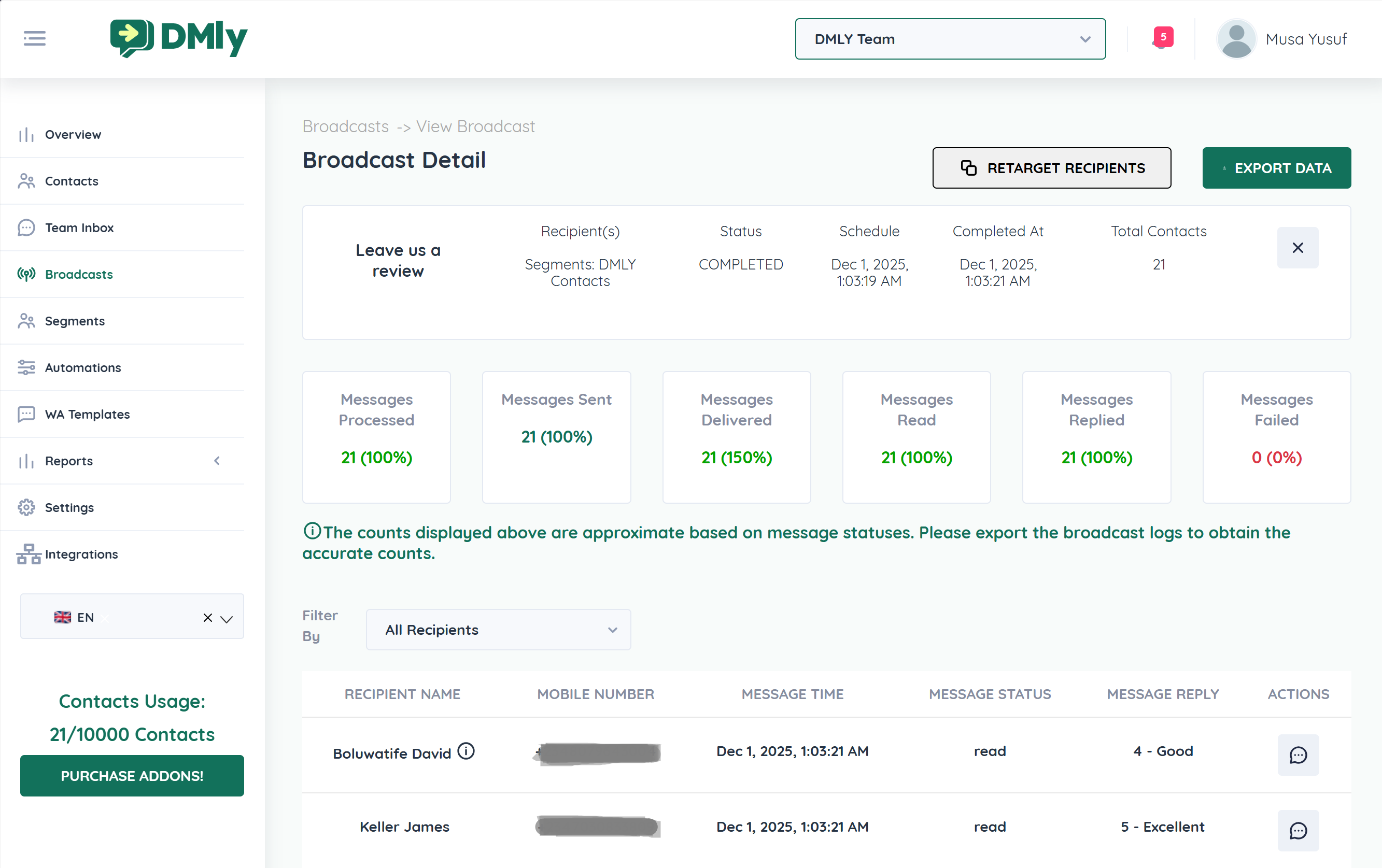
On the Broadcast Detail page, you’ll see key performance indicators displayed at the top:
Total number of messages processed by the system.
Messages successfully sent to recipients.
Messages successfully delivered to recipients' devices.
Recipients who opened/read the message.
Recipients who responded to your message.
Messages that failed due to errors (invalid number, unreachable contact, etc.).
These metrics give you a quick snapshot of campaign health.
The message was successfully handed off to the messaging platform.
The message reached the recipient’s device.
The recipient opened or viewed the message.
The recipient responded to the message.
The message could not be delivered due to:
Invalid phone number
Network issues
Platform restrictions
Contact blocked business account
Below the summary metrics, you can view detailed logs for each recipient, including:
Recipient Name
Mobile Number
Message Time
Message Status
Message Reply
This allows you to track:
Who engaged
Who replied
Who failed delivery
What replies were received
You can filter results by engagement type:
All Recipients
Delivered Recipients
Read Recipients
Replied Recipients
Failed Recipients
This makes it easy to:
Create retarget campaigns
Identify warm leads
Follow up with non-responders
Exclude failed numbers
For deeper analysis, use the Export Data button.
Exported logs allow you to:
Generate performance reports
Analyze engagement trends
Share insights with your team
Track campaign ROI
Identify conversion patterns
The system also notes that on-screen counts are approximate — exporting provides the most accurate data.
Improve subject line (template header)
Adjust sending time
Improve message hook
Improve call-to-action
Add urgency
Simplify response options
Use clearer buttons
Clean contact list
Remove invalid numbers
Verify formatting (country codes)
Retarget with next-step offer
Segment engaged contacts
Build follow-up automation
Analytics enable behavior-based retargeting:
Sent but Not Replied → Send reminder
Read but No Action → Add incentive
Replied → Move to next funnel stage
Failed → Clean up contact data
This transforms broadcast messaging into a conversion funnel.
Send broadcast
Review delivery metrics
Export logs
Identify engagement group
Create retarget segment
Send optimized follow-up
Repeat and refine.
Counts displayed are approximate; export for exact data.
Delivery status may depend on platform confirmation timing.
Replies shown reflect inbound responses linked to the broadcast.
