The Broadcast Performance page gives you a complete overview of how your campaign performed, from messages sent to replies received. This helps you measure engagement, delivery success, and overall campaign effectiveness.
At the top of the Broadcast Detail page, you can see:
Broadcast Name
Recipient Segment
Status (Completed, Scheduled, etc.)
Schedule Date
Completion Date
Total Contacts Targeted
This summary confirms when the broadcast ran and how many contacts were included.
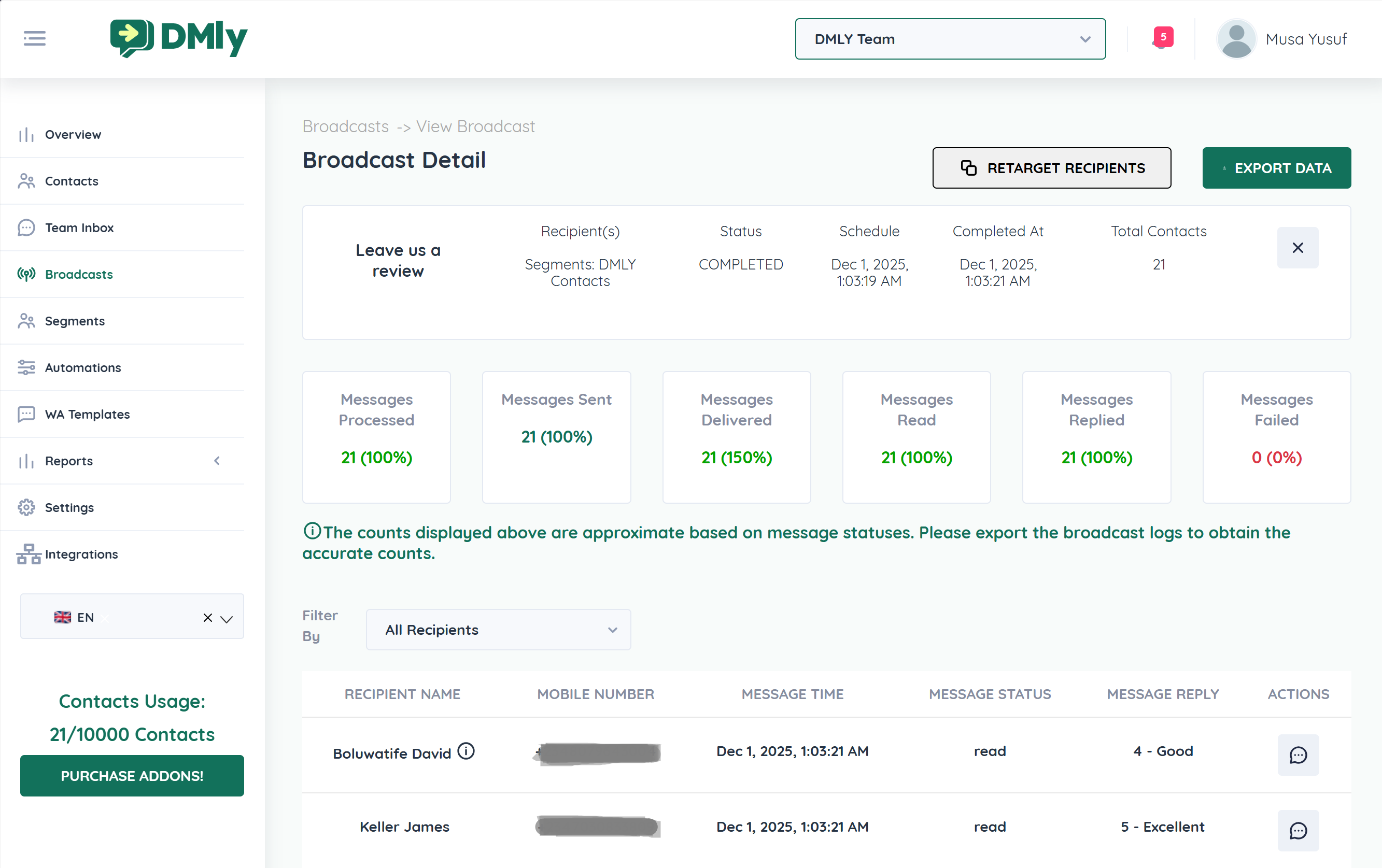
DMLY tracks several performance indicators for every broadcast:
Total messages queued and processed by the system.
Messages successfully sent to the channel provider.
Messages confirmed as delivered to recipients.
Recipients who opened or viewed the message.
Contacts who responded to the broadcast.
Messages that were not delivered due to errors (invalid numbers, restrictions, etc.).
These metrics give you a clear picture of your broadcast performance at a glance.
By comparing the metrics, you can determine:
Delivery Rate = Delivered ÷ Sent
Read Rate = Read ÷ Delivered
Reply Rate = Replied ÷ Delivered
Failure Rate = Failed ÷ Sent
High read and reply rates indicate strong engagement.
Low failure rates indicate healthy contact data.
Scroll down to view detailed logs for each recipient:
Contact Name
Mobile Number
Message Time
Message Status (Sent, Delivered, Read)
Message Reply (if applicable)
This allows you to:
See who engaged
Identify who did not respond
Monitor individual feedback (e.g., CSAT ratings)
You can click Retarget Recipients to:
Send follow-up messages to non-responders
Re-engage contacts who did not read
Launch targeted campaigns based on reply status
This improves campaign conversion rates.
For deeper analysis:
Click Export Data
Download broadcast logs
Analyze results externally (Excel, reporting tools, etc.)
Exporting ensures you have access to detailed records beyond the summary metrics.
The displayed counts are approximate based on message statuses.
For exact reporting and auditing, use the export feature.
Monitoring broadcast performance helps you:
Improve campaign timing
Optimize message content
Clean up invalid contacts
Increase response rates
Measure customer engagement
Track survey or CSAT results
After every broadcast:
Review delivery and read rates
Analyze replies and engagement
Retarget non-responders
Export data for long-term reporting
Consistent monitoring ensures your messaging strategy becomes more effective over time.
